Tag Archives: security

7:21 PM 2/26/2012

I recently ran the spider at www.xml-sitemaps.com against www.ardamis.com and it returned a list of URLs that included a few pages with some suspicious-looking parameters. This is the second time I’ve come across these URLs, so I decided to document what was going on. The first time, I just cleared the cache, spidered the site to preload the cache, and confirmed that the spider didn’t encounter the pages. And then I forgot all about it. But now I’m mad.

Normally, a URL list for a WordPress site includes the various pages of the site, like so:


http://www.ardamis.com/


http://www.ardamis.com/page/2/


http://www.ardamis.com/page/3/

But in the suspicious URL list, there are additional URLs for the pages directly off of the site’s root.


http://www.ardamis.com/


http://www.ardamis.com/?option=com_google&controller=..%2F%2F..%2F%2F..%2F%2F..%2F%2F..%2F%2F..%2F%2F..%2F%2F..%2F%2F%2Fproc%2Fself%2Fenviron%0000


http://www.ardamis.com/page/2/


http://www.ardamis.com/page/2/?option=com_google&controller=..%2F%2F..%2F%2F..%2F%2F..%2F%2F..%2F%2F..%2F%2F..%2F%2F..%2F%2F%2Fproc%2Fself%2Fenviron%0000


http://www.ardamis.com/page/3/


http://www.ardamis.com/page/3/?option=com_google&controller=..%2F%2F..%2F%2F..%2F%2F..%2F%2F..%2F%2F..%2F%2F..%2F%2F..%2F%2F%2Fproc%2Fself%2Fenviron%0000

This occurs only for the pagination of the main site’s pages. I did not find URLs containing the parameter ?option=com_google&controller= for any pages that exist under a category or tag, but that also use the /page/2/ convention.

The parameter is the urlencoded version of the text:

?option=com_google&controller=..//..//..//..//..//..//..//..///proc/self/environ00

Exploration

I compared the source code of the pages at the clean URLs vs that of the pages at the bad URLs and found that there was a difference in the pagination code generated by the WP-Paginate plugin.

The good pages had normal-looking pagination links.

<div class="navigation">
<ol class="wp-paginate">
<li><span class="title">Navigation:</span></li>
<li><a href="http://www.ardamis.com/page/2/" class="prev">&laquo;</a></li>
<li><a href='http://www.ardamis.com/' title='1' class='page'>1</a></li>
<li><a href='http://www.ardamis.com/page/2/' title='2' class='page'>2</a></li>
<li><span class='page current'>3</span></li>
<li><a href='http://www.ardamis.com/page/4/' title='4' class='page'>4</a></li>
<li><a href='http://www.ardamis.com/page/5/' title='5' class='page'>5</a></li>
<li><a href='http://www.ardamis.com/page/6/' title='6' class='page'>6</a></li>
<li><a href='http://www.ardamis.com/page/7/' title='7' class='page'>7</a></li>
<li><span class='gap'>...</span></li>
<li><a href='http://www.ardamis.com/page/17/' title='17' class='page'>17</a></li>
<li><a href="http://www.ardamis.com/page/4/" class="next">&raquo;</a></li>
</ol>
</div>    

The bad pages had the suspicious URLs, but were otherwise identical. Other than the URLs in the navigation, there was nothing alarming about the HTML on the bad pages.

I downloaded the entire site and ran a malware scan against the files, which turned up nothing. I also did some full-text searching of the files for the usual base64 decode eval type stuff, but nothing was found. I searched through the tables in my database, but didn’t see any instances of com_google or proc or environ that I could connect to the suspicious URLs.

Google it

Google has turned up a few good links about this problem, including:

  1. http://www.exploitsdownload.com/search/com_/36 – AntiSecurity/Joomla Component Contact Us Google Map com_google Local File Inclusion Vulnerability
  2. http://forums.oscommerce.com/topic/369813-silly-hacker/ – “On a poorly-secured LAMP stack, that would read out your server’s environment variables. That is one step in a process that would grant the hacker root access to your box. Be thankful it’s not working. Hacker is a bad term for this. This is more on the Script Kiddie level.”

    The poster also provided a few lines of code for blocking these URLs in an .htaccess file.

    # Block another hacker
    RewriteCond %{QUERY_STRING} ^(.*)/self/(.*)$ [NC]
    RewriteRule ^.* - [F]
    
  3. http://forums.oscommerce.com/topic/369813-silly-hacker/ – “This was trying for Local File Inclusion vulnerabilities via the Joomla/Mambo script.”
  4. http://core.trac.wordpress.org/ticket/14556 – a bug ticket submitted to WordPress over a year earlier identifying a security hole if the function that generates the pagination isn’t wrapped in a url_esc function that sanitizes the URL. WP-Paginate’s author submits a comment to the thread, and the plugin does use url_esc.

So, what would evidence of an old Joomla exploit be doing on my WordPress site? And what is happening within the WP-Paginate plugin to cause these parameters to appear?

Plugins

It seemed prudent to take a closer look at two of the plugins used on the site.

Ardamis uses the WP-Paginate plugin. The business of generating the /page/2/, /page/3/ URLs is a native WordPress function, so it’s strange to see how those URLs become subject to some sort of injection by way of the WP-Paginate plugin. I tried passing a nonsense parameter in a URL (http://www.ardamis.com/page/3/?foobar) and confirmed that the navigation links created by WP-Paginate contained that ?foobar parameter within each link. This happens on category pages, too. This behavior of adding any parameters passed in the URL to the links it is writing into the page, even if they are urlencoded, is certainly unsettling.

The site also uses the WP Super Cache plugin. While this plugin seems to have been acting up lately, in that it’s not reliably preloading the cache, I can’t make a connection between it and the problem. I also downloaded the cache folder and didn’t see cached copies of these URLs. I turned off caching in WP Super Cache but left the plugin activated, cleared the cache, and then sent the spider against the site again. This time, the URL list didn’t contain any of the bad URLs. Otherwise, the lists were identical. I re-enabled the plugin, attempted to preload the cache (it got through about 70 pages and then stopped), and then ran a few spiders against the site to finish up the preloading. I generated another URL list and the bad URLs didn’t appear in it, either.

A simple fix for the WP-Paginate behavior

The unwanted behavior of the WP-Paginate plugin can be corrected by changing a few lines of code to strip off the GET parameters from the URL. The lines to be changed all reference the function get_pagenum_link. I’m wrapping that function in the string tokenizing function strtok to strip the question mark and everything that follows.

The relevant snippets of the plugin are below.

			
$prevlink = ($this->type === 'posts')
? esc_url(strtok(get_pagenum_link($page - 1), '?'))
: get_comments_pagenum_link($page - 1);
$nextlink = ($this->type === 'posts')
? esc_url(strtok(get_pagenum_link($page + 1), '?'))
: get_comments_pagenum_link($page + 1);
			
function paginate_loop($start, $max, $page = 0) {
    $output = "";
    for ($i = $start; $i <= $max; $i++) {
        $p = ($this->type === 'posts') ? esc_url(strtok(get_pagenum_link($i), '?')) : get_comments_pagenum_link($i);
        $output .= ($page == intval($i))
        ? "<li><span class='page current'>$i</span></li>"
        : "<li><a href='$p' title='$i' class='page'>$i</a></li>";
    }
    return $output;
}

Once these changes are made, WP-Paginate will no longer insert any passed GET parameters into the links it’s writing into that page.

Bandaid

The change to the WP-Paginate plugin is what we tend to call a bandaid – it doesn’t fix the problem, it just suppresses the symptom.

I’ve found that once the site picks up the bad URLs, they can be temporarily cleaned by clearing the cache and then using a spider to recreate it. The only thing left to do is determine where they are coming from in the first place.

The facts

Let’s pause to review the facts.

  1. The http://www.xml-sitemaps.com spider sent against http://www.ardamis.com discovers pages with odd parameters that shouldn’t be naturally occurring on the pages
  2. The behavior of the WP-Paginate plugin is to accept any parameters passed and tack them onto the URLs it is generating
  3. Deleting the cached pages created by WP Super Cache and respidering produces a clean list – the bad URLs are absent

So how is the spider finding pages with these bad URLs? How are they first getting added to a page on the site? It would seem likely that they are originating only on the home page, and the absence of the parameters on other pages that use pagination seems to support that theory.

An unsatisfying ending

Well, the day is over. I’ve added my updated WP-Paginate plugin to the site, so hopefully Ardamis has seen the last of the problem, but I’m deeply unsatisfied that I haven’t been able to get to the root cause. I’ve scoured the site and the database, and I can’t find any evidence of the URLs anywhere. If the bad URLs come back again, I’ll not be so quick to clean up the damage, and will instead try to preserve it long enough to make a determination as to their origin.

Update 07 April 2012: It’s happened again. When I spider the site, two pages have the com_google URL. These page have the code appended to the end of the URL created by the WordPress function cancel_comment_reply_link(). This function generates the anchor link in the comments area with an ID of cancel-comment-reply-link. This time, though, I see the hijacked URL used in the link even when I visit the clean URL of the page.

This code is somehow getting onto the site in such a way that it only shows up in the WP Super Cache’d pages. Clearing the cache and revisiting the page returns a clean page. My suspicion is that someone is visiting my pages with the com_google code as part of the URL. WordPress puts the code into a self-referencing link in the comment area. WP Super Cache then updates the cache with this page. I don’t think WordPress can help but work this way with nested comments, but WP Super Cache should know better than to create a cached page from anything but the content from the server.

In the end, because I wasn’t using nested comments to begin with, I chose to remove the block of code that was inserting the link from my theme’s comments.php file.

    <div class="cancel_comment_reply">
        <small><?php cancel_comment_reply_link(); ?></small>
    </div>

I expect that this will be the last time I find this type of exploit on ardamis.com, as I don’t think there is any other mechanism that will echo out on the page the contents of a parameter passed in the URL.

In the VBScript example below, I’m using the Icacls.exe utility to assign modify permissions to the D:Test folder for the user Oliver on the LOOMER domain (or local machine). The script includes as comments some good resources on the subject.

' http://support.microsoft.com/kb/919240
' http://technet.microsoft.com/en-us/magazine/2009.07.geekofalltrades.aspx
' http://timbolton.net/2010/06/23/icacls-changing-permissions-on-files-and-folders/

Dim strFolder, strUser, strDomain

strFolder = "D:Test"
strUser = "Oliver"
strDomain = "LOOMER"

SetPermissions
	
Function SetPermissions()
	Dim intRunError, objShell, objFSO

	Set objShell = CreateObject("Wscript.Shell")
	Set objFSO = CreateObject("Scripting.FileSystemObject")
	If objFSO.FolderExists(strFolder) Then
		intRunError = objShell.Run("icacls " & strFolder & " /inheritance:r /grant:r " & strDomain &"" & strUser & ":(OI)(CI)M ", 2, True)
		
		If intRunError <> 0 Then
			Wscript.Echo "Error assigning permissions for user " & strUser & " to folder " & strFolder
		End If
	Else
		Wscript.Echo "Error: folder " & strFolder & " does not exist"
	End If
End Function

This script is a work-in-progress. To be considered complete, I want it to be able to create multiple directories and assign them permissions. For extra credit, I want it to be able to accept as input a list of usernames from a text file and iterate through them, creating folders where necessary and assigning them permissions.

In the endless battle against WordPress comment spam, I’ve developed and then refined a few different methods for preventing spam from getting to the database to begin with. My philosophy has always been that a human visitor and a spam bot behave differently (after all, we’re not dealing with Nexus-6 model androids here), and an effective spam-prevention method should be able to recognize the differences. I also have a dislike for CAPTCHA methods that require a human visitor to prove, via an intentionally difficult test, that they aren’t a bot. The ideal method, I feel, would be invisible to a human visitor, but still accurately identify comments submitted by bots.
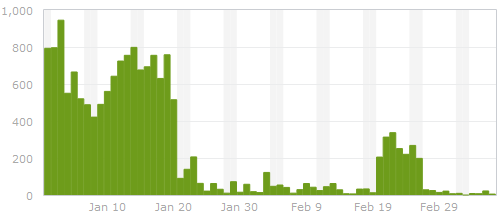
Spam on ardamis.com - before and after

Spam on ardamis.com - before and after

A history of spam fighting

The most successful and simple method I found was a server-side system for reducing comment spam by using a handshake method involving timestamps on hidden form fields. The general idea was that a bot would submit a comment more quickly than a human visitor, so if the comment was submitted too soon after the page was loaded, it was rejected. A human caught in this trap would be able to click the Back button on the browser to resubmit. This had proven to be very effective on ardamis.com, cutting the number of spam comments intercepted by Akismet per day to nearly zero. For a long time, the only problem was that it required modifying a core WordPress file, wp-comments-post.php. Each time WordPress was updated, the core file was replaced. If I didn’t then go back and make my modifications again, I would lose the spam protection until I made the changes. As it became easier to update WordPress (via the admin panel) and I updated it more frequently, editing the core file became more of a nuisance.

A huge facepalm

When Google began weighting page load times as part of its ranking algorithm, I implemented the WP Super Cache caching plugin on ardamis.com and configured it to use .htaccess and mod_rewrite to serve cache files. Page load times certainly decreased, but the amount of spam detected by Akismet increased. After a while, I realized that this was because the spam bots were submitting comments from static, cached pages, and the timestamps on those pages, which had been generated server-side with PHP, were already minutes old when the page was requested. The form processing script, which normally rejects comments that are submitted too quickly to be written by a human visitor, happily accepted the timestamps. Even worse, a second function of my anti-spam method also rejected comments that were submitted 10 minutes or more after the page was loaded. Of course, most of the visitors were being served cached pages that were already more than 10 minutes old, so even legitimate comments were being rejected. Using PHP to generate my timestamps obviously was not going to work if I wanted to keep serving cached pages.

JavaScript to the rescue

Generating real-time timestamps on cached pages requires JavaScript. But instead of a reliable server clock setting the timestamp, the time is coming from the visitor’s system, which can’t be trusted to be accurate. Merely changing the comment form to use JavaScript to generate the first timestamp wouldn’t work, because verifying a timestamp generated on the client-side against one generated with a server-side language would be disastrous.

Replacing the PHP-generated timestamps with JavaScript-generated timestamps would require substantial changes to the system.

Traditional client-side form validation using JavaScript happens when the form is submitted. If the validation fails, the form is not submitted, and the visitor typically gets an alert with suggestions on how to make the form acceptable. If the validation passes, the form submission continues without bothering the visitor. To get our two timestamps, we can generate a first timestamp when the page loads and compare it to a second timestamp generated when the form is submitted. If the visitor submits the form too quickly, we can display an alert showing the number of seconds remaining until the form can be successfully submitted. This should hopefully be invisible to most visitors who choose to leave comments, but at the very least, far less irritating than a CAPTCHA system.

It took me two tries to get it right, but I’m going to discuss the less successful method first to point out its flaws.

Method One (not good enough)

Here’s how the original system flowed.

  1. Generate a first JS timestamp when the page is loaded.
  2. Generate a second JS timestamp when the form is submitted.
  3. Before the form is submitted, compare the two, and if enough time has passed, write a pre-determined passcode to a hidden INPUT element, then submit the form.
  4. On the form processing page, use server-side logic to verify that the passcode is present and valid.

The problem was that it seemed that certain bots could parse JavaScript enough to drop the pre-determined passcode into the hidden form field before submitting the form, circumventing the timestamps completely and defeating the system.

It also failed to adhere to one of the basic tenants of form validation – that the input must be checked on both the client-side and the server-side.

Method Two (better)

Rather than having the server-side validation be merely a check to confirm that the passcode is present, method two goes back to comparing the timestamps a second time on the server side. Instead of a single hidden input, we now have two – one for each timestamp. This is intended to prevent a bot from figuring out the ultimate validation mechanism by simply parsing the JavaScript. Finally, the hidden fields are added to the form via jQuery, which makes it easier to implement and may act as another layer of obfuscation.

  1. Generate a first JS timestamp when the page is loaded and write it to a hidden form field.
  2. Generate a second JS timestamp when the form is submitted and write it to a hidden form field.
  3. Before the form is submitted, compare the two, and if enough time has passed, submit the form (client-side validation).
  4. On the form processing page, use server-side logic to compare the timestamps a second time (server-side validation).

The timestamp handshake works more like it did in the server-side-only method. We still have to pass something from the comment form to the processing script, but it’s not too obvious from the HTML what is being done with it.

The same downside plagues me

Unfortunately, if we want to have any server-side validation at all, and we do, the core file wp-comments-post.php will still have to be modified. In my experience, the system is only modestly effective using just client-side validation.

The code

Two files must be modified to implement the validation.

File 1: The theme’s comments.php file (older themes) or wp-includescomment-template.php (newer themes)

Your comment form lives somewhere. My theme is based on Kubrick, the old default WordPress theme, and my comment form is in my theme folder, in a file named comments.php. If your theme is newer and based on the current default theme, twentyeleven, the form is in wp-includescomment-template.php. If your theme isn’t based on either of these, all bets are off. I know it’s confusing. Sorry.

Add the JavaScript that creates and populates the timestamp fields. Be sure to confirm that your comment form has an ID of commentform. I’m using jQuery to help fire functions when the page loads.

<script type="text/javascript" src="http://ajax.googleapis.com/ajax/libs/jquery/1.7.1/jquery.min.js"></script>
<script type="text/javascript">
$(document).ready(function(){
	ardGenTS1();
});

function ardGenTS1() {
	// prepare the form
	$('#commentform').append('<input type="hidden" name="ardTS1" id="ardTS1" value="1" />');
	$('#commentform').append('<input type="hidden" name="ardTS2" id="ardTS2" value="1" />');
	$('#commentform').attr('onsubmit', 'return validate()');
	// set a first timestamp when the page loads
	var ardTS1 = (new Date).getTime();
	document.getElementById("ardTS1").value = ardTS1;
}

function validate() {
	// read the first timestamp
	var ardTS1 = document.getElementById("ardTS1").value;
//	alert ('ardTS1: ' + ardTS1);
	// generate the second timestamp
	var ardTS2 = (new Date).getTime();
	document.getElementById("ardTS2").value = ardTS2;
//	alert ('ardTS2: ' + document.getElementById("ardTS2").value);
	// find the difference
	var diff = ardTS2 - ardTS1;
	var elapsed = Math.round(diff / 1000);
	var remaining = 10 - elapsed;
//	alert ('diff: ' + diff + 'nnelapsed:' + elapsed);
	// check whether enough time has elapsed
	if (diff > 10000) {
		// submit the form
		return true;
	}else{
		// display an alert if the form is submitted within 10 seconds
		alert("This site is protected by an anti-spam feature that requires 10 seconds to have elapsed between the page load and the form submission.nnPlease close this alert window.  The form may be resubmitted successfully in " + remaining + " seconds.");
		// prevent the form from being submitted
		return false;
	}
}
</script>

File 2: The wp-comments-post.php file

The wp-comments-post.php file lives in the root of WordPress and handles the form processing. We need to add a few lines that check the contents of our new validation input field.

Somewhere after line 53 or so (where $comment_content is defined), insert the following code.

$ardTS1 = ( isset($_POST['ardTS1']) ) ? trim($_POST['ardTS1']) : 1;
$ardTS2 = ( isset($_POST['ardTS2']) ) ? trim($_POST['ardTS2']) : 2;
$ardTS = $ardTS2 - $ardTS1;

if ( $ardTS < 10000 ) {
// If the difference of the timestamps is not more than 10 seconds, exit
    wp_die( __('<strong>ERROR</strong>:  This site uses JavaScript validation to reduce comment spam.  Either your browser has JavaScript disabled, or the comment was not legitimately submitted.') );
}

That’s it. Not so bad, right?

Final thoughts

One advantage to this method over the old PHP-only method is that even if the core file is replaced and the server-side validation is lost, the client-side validation continues to work, providing some measure of protection. The screen-shot at the beginning of the post shows the number of spam comments submitted to ardamis.com and detected by Akismet each day from the end of January, 2012, to the beginning of March, 2012. The dramatic drop-off around Jan 20 was when I implemented the method described in this post. The flare-up around Feb 20 was when I updated WordPress and forgot to replace the modified core file for about a week.

Now, for a little extra protection, you can rename the wp-comments-post.php file and change the path in the comment form’s action attribute. I’ve posted logs showing that some bots just try to post spam directly to the wp-comments-post.php file, so renaming that file is an easy way to cut down on spam. Just remember to come back and delete the wp-comments-post.php file each time you update WordPress.

While making changes to my WordPress theme, I noticed that the error_log file in my theme folder contained dozens of PHP Fatal error lines:

...
[01-Jun-2011 14:25:15] PHP Fatal error:  Call to undefined function  get_header() in /home/accountname/public_html/ardamis.com/wp-content/themes/ars/index.php on line 7
[01-Jun-2011 20:58:23] PHP Fatal error:  Call to undefined function  get_header() in /home/accountname/public_html/ardamis.com/wp-content/themes/ars/index.php on line 7
...

The first seven lines of my theme’s index.php file:

<?php ini_set('display_errors', 0); ?>
<?php
/**
 * @package WordPress
 * @subpackage Ars_Theme
*/
get_header(); ?>

I realized that the error was being generated each time that my theme’s index.php file was called directly, and that the error was caused by the theme’s inability to locate the WordPress get_header function (which is completely normal). Thankfully, the descriptive error wasn’t being output to the browser, but was only being logged to the error_log file, due to the inclusion of the ini_set(‘display_errors’, 0); line. I had learned this the hard way a few months ago when I found that calling the theme’s index.php file directly would generate an error message, output to the browser, that would reveal my hosting account username as part of the absolute path to the file throwing the error.

I decided the best way to handle this would be to check to see if the file could find the get_header function, and if it could not, simply redirect the visitor to the site’s home page. The code I used to do this:

<?php ini_set('display_errors', 0); ?>
<?php
/**
* @package WordPress
* @subpackage Ars_Theme
*/
if (function_exists('get_header')) {
	get_header();
}else{
    /* Redirect browser */
    header("Location: http://" . $_SERVER['HTTP_HOST'] . "");
    /* Make sure that code below does not get executed when we redirect. */
    exit;
}; ?>

So there you have it. No more fatal errors due to get_header when loading the WordPress theme’s index.php file directly. And if something else in the file should throw an error, ini_set(‘display_errors’, 0); means it still won’t be sent to the browser.

Typically, your ISP provides DNS services. In an ideal world, this would work well, as your ISP’s DNS server ought to be geographically close to your machine and should be able to perform look ups quickly. However, there are a number of reasons why you might want to use a public DNS server instead of your ISP’s server. The two big public DNS servers are OpenDNS and Google Public DNS.

OpenDNS

The OpenDNS nameserver IP addresses are:

  • 208.67.222.222
  • 208.67.220.220

http://www.opendns.com/support/article/197

You can confirm that you are using OpenDNS as your DNS resolution service by visiting http://www.opendns.com/welcome/.

Google Public DNS

The Google Public DNS nameserver IP addresses are:

  • 8.8.8.8
  • 8.8.4.4

http://code.google.com/speed/public-dns/docs/using.html

Speed test

So which DNS servers are faster for you?

Try out namebench. It hunts down the fastest DNS servers available for your computer to use. (For Mac OS X, Windows, and UNIX.)

http://code.google.com/p/namebench/

Using OpenDNS to filter (whitelist/blacklist) content

If you have an account with OpenDNS, you can whitelist and blacklist IP addresses. A free account allows you to whitelist or blacklist 25 addresses; paid accounts allow more.

  1. Create an account at OpenDNS.
  2. Set up a network for your physical location (your current IP address).
  3. Configure your machine to use the OpenDNS servers.
  4. Install the client software for updating a dynamic IP in an OpenDNS network – http://www.opendns.com/support/article/90.

Technically more sophisticated users may discover that manually setting the DNS servers on a computer allows that computer to circumvent the OpenDNS filtering. To prevent a machine from bypassing the OpenDNS filtering, you could configure the DNS servers directly on the router and then block all outgoing DNS requests to all DNS servers except the OpenDNS servers.

OpenDNS system status

It’s a good idea to be able to check the condition of your DNS server.

The OpenDNS system status page’s IP address is http://208.69.38.170/.

Seriously restricting internet access

What I really want to do is severely restrict internet access on a single machine on my LAN. For this machine, I want to manage a small whitelist of domains and block access to everything else. OpenDNS doesn’t seem to offer this type of functionality.

Just a few notes to myself about monitoring web sites for infections/malware and potential vulnerabilities.

Tools for detecting infections on web sites

Google Webmaster Tools

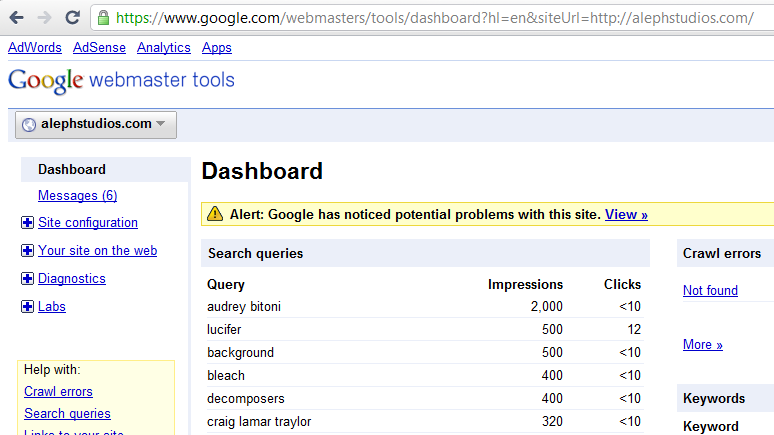
Your first stop should be here, as I’ve personally witnessed alerts show up in Webmaster Tools, even when all the following tools gave the site a passing grade. If your site is registered here, and Google finds weird pages on your site, an alert will appear. You can also have the messages forwarded to your email account on file, by choosing the Forward option under the All Messages area of the Home page.

Google Webmaster Tools Hack Alert

Google Safe Browsing

The Google Safe Browsing report for ardamis.com: http://safebrowsing.clients.google.com/safebrowsing/diagnostic?site=ardamis.com

Norton Safe Web

https://safeweb.norton.com/

The Norton Safe Web report for ardamis.com: https://safeweb.norton.com/report/show?url=ardamis.com

Tools for analyzing a site for vulnerabilities

Sucuri Site Check

http://sitecheck.sucuri.net/scanner/

The Sucuri report for ardamis.com: http://sitecheck.sucuri.net/scanner/?scan=www.ardamis.com.

As an IT guy in a good-sized law firm, I’m sometimes asked to make recommendations for anti-virus software.

For real-time protection that is always running on your computer, I like Microsoft Security Essentials.

Microsoft Security Essentials provides real-time protection for your home PC that helps guard against viruses, spyware, and other malicious software.
http://www.microsoft.com/security_essentials/default.aspx

If you don’t trust Microsoft, SUPERAntispyware has a terrible name but a good track record.

The SUPERAntiSpyware FREE Edition offers real-time blocking of threats.
http://www.superantispyware.com/

The SUPERAntiSpyware Portable Scanner can be run from a USB flash drive or CD without installlation.

The SUPERAntiSpyware Portable Scanner does not install anything on your Start Menu or Program Files and does not need to be uninstalled. Just download it and run it whenever you want.
http://www.superantispyware.com/portablescanner.html

Personally, I run Microsoft Security Essentials, and then do supplemental scans with the SUPERAntiSpyware Portable Scanner.

Update 2/22/2010: It looks like changing .htaccess is no longer necessary. After you select PHP 5.x, your site will begin using version 5.2.5 without any further configuration.

The following applies to older domains. As of early 2009, newly purchased linux hosting plans are running PHP 5.2.8, while older plans, once updated, only go up to PHP 5.2.5. I’ve had Ardamis.com hosted at GoDaddy since 2005, and quite awhile ago I thought I had upgraded to PHP version 5 from 4.3.11, but tonight I happened to check with phpinfo and found I was still on version 4.

In the unheard of ten minutes that I was on hold waiting for technical support, I figured out how to really run my pages on PHP 5.x (in this case, 5.2.5).

Log in and go to your Hosting Control Center. You must be running Hosting Configuration 2.0 to go any further, so if you haven’t touched your domain in years, do that first.

Click on Content, then Add-On Languages. Next to PHP Version, select PHP 5.x and click Continue. You’ll get a message that “Changing to PHP 5.x may make your PHP files run incorrectly.” Highly unlikely these days, but OK, you’ve been warned. Notice, too that it says “PHP 5.x will be activated“. Click Update.

It may take awhile for this change to be processed by the server, but once your Account Summary is displaying PHP Version: 5.x, it’s time for the really important part.

You see, you’ve only made PHP 5.x available at this point. Your *.php files are still running in 4.x. Go ahead and check phpinfo again.

Now, you could simply edit .htaccess to change the extensions, like so:

AddHandler x-httpd-php5 .php
AddHandler x-httpd-php .php4

More details at http://help.godaddy.com/article/1082

But if you’re squeamish about changing .htaccess yourself, there’s another way to set 5.x to be the default handler for *.php files. All the following does, strangely enough, is to add the AddHandler x-httpd-php5 .php to the beginning of your .htaccess file.

Back in the Hosting Control Center, click on Settings, then File Extension. If the change to 5.x has been completed, you’ll see at the bottom of the available extensions list, “Extension -> .php | Runs Under -> PHP 5.x” If it’s not there, stop here and come back in an hour or so.

Click on Custom Extensions at the left. This should be empty, with a message stating “No custom extensions have been created.”

Click on Default Extensions and then click on the Edit button (it looks like a piece of paper and a pencil) to the right of .php | PHP 5.x. Click on Continue.

Click again on the Custom Extensions button on the left, and you should now see “Extension -> .php | Runs Under -> PHP 5.x”. Check your phpinfo page one more time, and it should report PHP 5.x.

It’s unfortunate we even have to do this for our older domains, but I asked the tech support guy if I could somehow get on to PHP 5.2.8, and he said nope, that the newer servers have the more recent version but the older servers are stuck back in 2007.