Tag Archives: blogging

I am looking for cheap, shared web hosting because the downtime and customer support I’m getting with JustHost is intollerable (and well documented). I’m willing to pay about $10/month for hosting, and I don’t ask for much other than reasonable uptime. I have a blog (ardamis.com) that gets about 1000 visits per day, a few other sites that barely get any traffic, and a small photo gallery that I share only with family and friends. I don’t stream or make available for download any video or audio files, but I do want to be able to upload all of my personal photos and use my web host as an off-site backup. I have an account with Drop Box, but I have gigs of photos, so I would have to purchase extra storage, and I kinda want to keep the Drop Box stuff separate. I’ve also considered using Google Drive, but I have enough photos that I would need to purchase additional space.

I’m currently paying $108/year for hosting and an additional $19.99/year for a dedicated IP address. I’m willing to pay a little more, but not terribly much more.

Before JustHost, I was a GoDaddy customer for something like 5 years, and there was almost no downtime. Customer service was incredibly, suprisingly good and the reps were always knowlegeable and effective. I left because I didn’t like the proprietary admin panel that GoDaddy has developed and wanted to keep my domain registrar and my web host at separate companies. But really, there was nothing wrong with GoDaddy’s hosting at the time, that I could tell.

The problem with researching new web hosts is that unbiased information (if it’s out there) is buried under tons of completely untrustworthy garbage sites that sell reviews and rankings. If you look for personal recommendations based on experiences with multiple hosts, it is extremely hard to tell from the obscure bulletin board threads whether the posts come from shills or actual customers. Even if one finds posts that appear to be from genuine customers, their descriptions of their experiences are usually subjective, anecdotal, and not comparative.

This post, then, is just my notes on what I’ve found while researching my next web host.

No Host

One option would be to not go with a hosting company at all and just use Amazon EC2 to self-host my blog. I have seriously considered doing this, but by some accounts, it’s actually more expensive to run an EC2 instance than purchase shared hosting. And I don’t really want to become my own linux administrator. As much as I enjoy occasionally tinkering with Ubuntu, I just want my sites to run smoothly and for someone to keep the server up-to-date and to fix problems for me quickly if something breaks.

Bluehost

http://www.bluehost.com/

Everyone has heard of Bluehost. They’re huge. Their tagline is “Trusted by Millions as the Best Web Hosting Solution”. So there you have it. Maybe you want to be one of their millions of customers.

According to the builtwith.com profile for ardamis.com, the site’s hosting provider is not JustHost but BlueHost! If that’s the case and they’re really the same company, or associated in any way at all, there is no way I’m going to switch to BlueHost.

Their website has terribly low production values, for being such a huge company. They have a crappy stock photograph of a dude with a headset providing customer support, below the text “We specialize in customer service. Call or Chat!” I do not want to live chat with this dude, or anyone else. I probably don’t need any customer service from my hosting company unless they screw something up, so prominently featuring your support phone numbers make me wonder if they get tons of calls.

They do have cPanel, which is nice, as I am wary of proprietary admin panels after using GoDaddy for years.

They also offer unlimited domains, unlimited storage, unlimited bandwith, unlimited email accounts, and a free domain. They also offer custom php.ini files and SSH access. And they do all of this for just $6.95/month for 1 year.

It actually sounds pretty decent, on paper. But one does get the sense that they are completely driven by the bottom-line, and that your site is going to be jammed into an already crowded server.

HostGator

http://www.hostgator.com/

HostGator is the other huge discount web hosting company, competing with BlueHost and GoDaddy for what I picture to be the same sort of confused customers or WordPress blog/Google Adsense scammers.

Like with BlueHost, I’m immediately turned off by the website, which is just ugly as all get out and also conspicuously promotes Live Chat support with a stock photograph of a girl with a (wired) headset. The pricing for the hosting plans is also a bit misleading, as all of the pricing shown is discounted 20%, which discount is only valid for the first invoice.

Another thing I really dislike is that there are three tiers of shared hosting, named “Hatchling Plan”, “Baby Plan”, and “Business Plan”. I just can’t see myself signing up for the ridiculously named “Hatchling Plan” or “Baby Plan”. Which is probably by design so that people like me upgrade to the more respectable and grown-up sounding “Business Plan”.

They do offer a single free website transfer for shared hosting, whether or not the site being transferred uses cPanel.

Lithium Hosting

http://www.lithiumhosting.com/

I first heard about Lithium Hosting while reading the ars technica article How to set up a safe and secure Web server, which also mentioned A Small Orange.

Their site looks pretty good, but it’s a little bit too template-like, and I felt that a quick glance on themeforest.net would turn up about a dozen hosting reseller templates for which the layout and stock placeholder text is an almost exact match. For example, the tagline on their home page is “Why we’re not the best host in the world.” Yeah, that sort of false modesty smells just a bit too contrived here. I was almost ready to sign up with Lithium Hosting, but the cookie-cutter stuff gave me enough pause to keep looking.

One of the things that I didn’t like is that they offer a free month coupon code, but it doesn’t work when you configure your cart to pay a year-at-a-time. Another thing I didn’t like was the $36/year cost of a dedicated IP address – $5 to set up and then $3 per month thereafter. It seems like the price on dedicated IP addresses has dramatically increased in the months since all the breathless news reports about the world running out of IPv4 addresses. They also charge an extra $60/year for shell access via SSH. That’s pretty shameful.

Bailing out of the cart just before purchase doesn’t cause a window to pop up an lure you back with a discount, as I fully expected to happen.

I checked out their Facebook page and the most recent post was from a guy who’s website was down. Two other recent posts were about downtime.

At the end of the day, Lithium Hosting just seems too much like a hosting reseller itself than a company that will be around for years.

A Small Orange

http://asmallorange.com/

I first heard about A Small Orange while reading the same ars technica article How to set up a safe and secure Web server that mentioned Lithium Hosting.

My first impression of the site was that it looked pretty much exactly as I wanted my hosting company to look. Again, I’m being pretty superficial here, but I want to be happy with my choice and if the company’s outward appearance is cruddy then I’m not going to be as satisfied. I want to be certain that I made the best choice, and a crappy, thrown-together-looking site injects a small amount of doubt. The site clearly sets out the costs of the different hosting plans, and I knew I would be looking at shared hosting first. There are five tiers of shared hosting, the least expensive being $35/year for 250 MB storage and 5 GB bandwidth. Basically, the only differentiating factor between the different levels of shared hosting is the amount storage and bandwidth. The standard features for all shared hosting accounts include:

  • Unlimited Parked and Addon Domains
  • Unlimited Subdomains
  • Unlimited POP3/IMAP Mail Accounts
  • Unlimited MySQL Databases
  • Unlimited FTP Accounts
  • Automated Daily Backups
  • cPanel
  • Automatic Script Installation (Softaculous)
  • Jailed shell upon request
  • FTP and SFTP access
  • Cron jobs for scheduled tasks
  • 99.9% uptime guarantee

A Small Orange uses CloudLinux as the server OS.

OK, yes, there is still a Live Chat button, but it’s this inconspicuous little green tab at the left side of the window that states “live help”. That’s it.

I checked out their Facebook page for recent posts, and they were almost entirely positive, with a good amount of interaction from the admin. The page claims that the company is home to 45,000 web sites, which might be exactly what I’m looking for, without even knowing it.

One of the things that convinced me to go with them was the Inc.com write up of CEO Douglas Hanna in America’s coolest College Start-Ups 2012 and the Duke Chronical article Hanna makes juicy profits with A Small Orange. Hanna worked at HostGator for two years in customer service, so one could reasonably expect that he knows what customers want in affordable hosting.

I have also found a ton of coupon codes for A Small Orange (just Google it) for either $5 or 15% off your order.

saveme$5
saveme15%
save_$5
save_15%
November was a rough month for ardamis.com. What are JustHost’s thoughts on uptime?

The term uptime refers to the amount of time that the website will be accessible. It is important to remember that unforeseen events do occur and that uptime guarantees are not written in stone. That being said, however, any established web hosting provider worthy of your business will strive to guarantee no less than 99.5% uptime.

http://www.justhost.com/web-hosting-articles/2010/12/06/the-uptime-guarantee/

Here’s my Pingdom Monthly Report for 2012-11-01 to 2012-11-30 for ardamis.com. Boy, those 34 outages for a total of 6 hours and 45 minutes (0.94%) sure feels like a lot of downtime.

Uptime Outages Response time
99.06% 34 1665 ms

Downtimes

From To Downtime
2012-11-02 06:14:08 2012-11-02 06:29:08 0h 15m 00s
2012-11-02 07:19:08 2012-11-02 07:44:10 0h 25m 02s
2012-11-05 22:54:09 2012-11-05 22:59:08 0h 04m 59s
2012-11-05 23:09:08 2012-11-05 23:19:08 0h 10m 00s
2012-11-07 14:24:09 2012-11-07 14:34:08 0h 09m 59s
2012-11-10 11:49:08 2012-11-10 11:54:08 0h 05m 00s
2012-11-10 12:09:08 2012-11-10 12:14:08 0h 05m 00s
2012-11-10 13:44:08 2012-11-10 13:49:10 0h 05m 02s
2012-11-10 15:24:08 2012-11-10 15:29:08 0h 05m 00s
2012-11-10 16:24:08 2012-11-10 16:29:09 0h 05m 01s
2012-11-10 16:49:08 2012-11-10 16:54:08 0h 05m 00s
2012-11-10 22:29:08 2012-11-10 22:34:08 0h 05m 00s
2012-11-11 22:34:08 2012-11-11 22:39:08 0h 05m 00s
2012-11-12 17:54:08 2012-11-12 17:59:08 0h 05m 00s
2012-11-17 00:49:08 2012-11-17 02:59:08 2h 10m 00s
2012-11-18 14:19:08 2012-11-18 14:24:08 0h 05m 00s
2012-11-19 03:54:08 2012-11-19 04:04:08 0h 10m 00s
2012-11-23 15:09:08 2012-11-23 15:24:08 0h 15m 00s
2012-11-23 15:44:08 2012-11-23 15:49:08 0h 05m 00s
2012-11-23 16:49:08 2012-11-23 16:54:08 0h 05m 00s
2012-11-26 10:04:08 2012-11-26 10:09:08 0h 05m 00s
2012-11-27 07:54:08 2012-11-27 07:59:08 0h 05m 00s
2012-11-27 15:24:08 2012-11-27 15:29:08 0h 05m 00s
2012-11-27 20:29:08 2012-11-27 20:34:08 0h 05m 00s
2012-11-27 21:34:08 2012-11-27 21:39:08 0h 05m 00s
2012-11-27 22:19:08 2012-11-27 22:24:08 0h 05m 00s
2012-11-27 23:54:08 2012-11-27 23:59:08 0h 05m 00s
2012-11-28 06:14:08 2012-11-28 06:19:08 0h 05m 00s
2012-11-28 06:24:08 2012-11-28 06:49:08 0h 25m 00s
2012-11-28 06:54:08 2012-11-28 06:59:08 0h 05m 00s
2012-11-28 07:04:08 2012-11-28 07:24:08 0h 20m 00s
2012-11-30 06:44:08 2012-11-30 06:49:08 0h 05m 00s
2012-11-30 07:04:08 2012-11-30 07:29:08 0h 25m 00s
2012-11-30 12:04:09 2012-11-30 12:09:08 0h 04m 59s
Copyright © 2012 Pingdom AB

That’s just a really pretty sad report.

I have got to be better about catching my contract before it automatically renews. I’m looking at Lithium Hosting and a small orange as replacements, as they seem to be well-regarded by Ars Technica readers.

My Google Reader feed is primarily Mashable, SEOmoz, and Smashing Magazine, with a few other sources that tend to come and go. Ideally, I’d like to come up with a way of displaying my starred items on a dedicated page here at ardamis.com, but until then, I guess I’ll just have to do it the old fashioned way.

Here are a few SEO articles that really are worth reading.

seomoz.org: Find Your Site’s Biggest Technical Flaws in 60 Minutes is a collection of tools and methods suitable for the non-technical site owner who wants to be a little more self-sufficient when it comes to identifying crawling, indexing and potential Panda-threatening issues.

seomoz.org: A New Way of Looking at Ranking Factors includes the really neat Periodic Table of SEO Ranking Factors and some explanation of the thought process behind it, and a short video on SEO basics.

searchengineland.com: The Periodic Table of SEO Ranking Factors is the original table, at full size.

seomoz.org: Set It and Forget It SEO: Chasing the Elusive Passive SEO Dream is a terrific article, both funny and technical, with two scripts to improve your tracking of inbound links and your site’s handling of requests that would normally 404.

seomoz.org: 12 Creative Design Elements Inspiring the Next Generation of UX is a randfish article with some really neat design examples.

sem-group.net: How To Optimize 7 Popular Social Media Profiles For SEO would be a good article to share with someone responsible for setting up profiles, but who doesn’t have a great deal of familiarity with things like H1 tags and nofollow links and their importance.

www.distilled.net: 7 Technical SEO Wins for Web Developers identifies areas where the developer, rather than the designer or content writer, can make improvements to a page’s SEO potential.

smashingmagazine.com: Clear Indications That It’s Time To Redesign isn’t really an SEO article at all, but it could be helpful when making an argument to change the site with the intention of improving bounce rate or other things related to visitor satisfaction.

smashingmagazine.com: Introduction To URL Rewriting does a good job of explaining what URL rewriting is and why you might want to do it.

Google’s Panda update and Google+ has motivated me to start using more cutting-edge technology at ardamis.com, starting with a new theme that makes better use of HTML5 and microformats.

I rather like the look of the current theme, but one of the metrics that Panda is supposedly weighting is bounce rate. Google Analytics indicates that the vast majority of my visitors arrive via organic search on Google while looking for answers to a particular problem. Whether or not they find their answer at ardamis.com, they tend not to click to other pages on the site. This isn’t bad, it’s just the way it works. I happen to be the same sort of user – generally looking for specific information and not casually surfing around a web site.

In the prior WordPress theme, I moved my navigation from the traditional location of along side the article to the bottom of the page, below the article. This cleaned up the layout tremendously and focused all the attention on the article, but it also made it even more likely that a visitor would bounce.

For the 2012 redesign, I moved the navigation back to the side and really concentrated on providing more obvious links to the About, Portfolio, Colophon and Contact pages.

I’ve been a fan of the HTML5 Boilerplate template for starting off hand-coded sites, and I’ve once again cherry-picked elements from it to use as a foundation. If you’re interested in a running start, you may try out the very nice Boilerplate WordPress theme by Aaron T. Grogg.

The latest version of the theme also faithfully follows the sometimes idiosyncratic whims of Google Webmaster Tools’ Rich Text Snippet Testing Tool. Look, no warnings.

Just a few weeks behind schedule, but a long time in the works, I’ve finally pushed the new WordPress theme for Ardamis live. Basic and elegant (I’m trying to establish a trend here), the theme also should outperform its predecessors in both page load times and SEO-potential. The index and archive pages should appear more consistent, and all pages should provide more complete structured data markup (schema.org as well as microformats.org). The comment form has been outfitted with an improved approach to reducing comment spam.

The new theme is pretty light on the graphics, due to increased browser support for and subsequently greater use of CSS3 goodness for box shadows and gradients. I’ve reduced the number of image files to two: a background and a sprites file.

Only half-implemented in the previous theme, the new look, “Joy”, makes much better use of structured data markup, or microdata. Google is absolutely looking for ways to display your pages’ semantic markup in its results, so you may as well get on board.

The frequency of spam comments increased dramatically over the past two months, according to my Akismet stats, so I’ve gone back to the drawing board and developed a better front-line defense against them. The new method should be more opaque to bots that parse JavaScript while still being invisible to human visitors leaving legitimate comments.

In sum, I think Ardamis should be leaner, faster, and smarter (and maybe prettier) in 2012 than ever before.

In the endless battle against WordPress comment spam, I’ve developed and then refined a few different methods for preventing spam from getting to the database to begin with. My philosophy has always been that a human visitor and a spam bot behave differently (after all, we’re not dealing with Nexus-6 model androids here), and an effective spam-prevention method should be able to recognize the differences. I also have a dislike for CAPTCHA methods that require a human visitor to prove, via an intentionally difficult test, that they aren’t a bot. The ideal method, I feel, would be invisible to a human visitor, but still accurately identify comments submitted by bots.

Spam on ardamis.com - before and after

Spam on ardamis.com - before and after

A history of spam fighting

The most successful and simple method I found was a server-side system for reducing comment spam by using a handshake method involving timestamps on hidden form fields. The general idea was that a bot would submit a comment more quickly than a human visitor, so if the comment was submitted too soon after the page was loaded, it was rejected. A human caught in this trap would be able to click the Back button on the browser to resubmit. This had proven to be very effective on ardamis.com, cutting the number of spam comments intercepted by Akismet per day to nearly zero. For a long time, the only problem was that it required modifying a core WordPress file, wp-comments-post.php. Each time WordPress was updated, the core file was replaced. If I didn’t then go back and make my modifications again, I would lose the spam protection until I made the changes. As it became easier to update WordPress (via the admin panel) and I updated it more frequently, editing the core file became more of a nuisance.

A huge facepalm

When Google began weighting page load times as part of its ranking algorithm, I implemented the WP Super Cache caching plugin on ardamis.com and configured it to use .htaccess and mod_rewrite to serve cache files. Page load times certainly decreased, but the amount of spam detected by Akismet increased. After a while, I realized that this was because the spam bots were submitting comments from static, cached pages, and the timestamps on those pages, which had been generated server-side with PHP, were already minutes old when the page was requested. The form processing script, which normally rejects comments that are submitted too quickly to be written by a human visitor, happily accepted the timestamps. Even worse, a second function of my anti-spam method also rejected comments that were submitted 10 minutes or more after the page was loaded. Of course, most of the visitors were being served cached pages that were already more than 10 minutes old, so even legitimate comments were being rejected. Using PHP to generate my timestamps obviously was not going to work if I wanted to keep serving cached pages.

JavaScript to the rescue

Generating real-time timestamps on cached pages requires JavaScript. But instead of a reliable server clock setting the timestamp, the time is coming from the visitor’s system, which can’t be trusted to be accurate. Merely changing the comment form to use JavaScript to generate the first timestamp wouldn’t work, because verifying a timestamp generated on the client-side against one generated with a server-side language would be disastrous.

Replacing the PHP-generated timestamps with JavaScript-generated timestamps would require substantial changes to the system.

Traditional client-side form validation using JavaScript happens when the form is submitted. If the validation fails, the form is not submitted, and the visitor typically gets an alert with suggestions on how to make the form acceptable. If the validation passes, the form submission continues without bothering the visitor. To get our two timestamps, we can generate a first timestamp when the page loads and compare it to a second timestamp generated when the form is submitted. If the visitor submits the form too quickly, we can display an alert showing the number of seconds remaining until the form can be successfully submitted. This should hopefully be invisible to most visitors who choose to leave comments, but at the very least, far less irritating than a CAPTCHA system.

It took me two tries to get it right, but I’m going to discuss the less successful method first to point out its flaws.

Method One (not good enough)

Here’s how the original system flowed.

  1. Generate a first JS timestamp when the page is loaded.
  2. Generate a second JS timestamp when the form is submitted.
  3. Before the form is submitted, compare the two, and if enough time has passed, write a pre-determined passcode to a hidden INPUT element, then submit the form.
  4. On the form processing page, use server-side logic to verify that the passcode is present and valid.

The problem was that it seemed that certain bots could parse JavaScript enough to drop the pre-determined passcode into the hidden form field before submitting the form, circumventing the timestamps completely and defeating the system.

It also failed to adhere to one of the basic tenants of form validation – that the input must be checked on both the client-side and the server-side.

Method Two (better)

Rather than having the server-side validation be merely a check to confirm that the passcode is present, method two goes back to comparing the timestamps a second time on the server side. Instead of a single hidden input, we now have two – one for each timestamp. This is intended to prevent a bot from figuring out the ultimate validation mechanism by simply parsing the JavaScript. Finally, the hidden fields are added to the form via jQuery, which makes it easier to implement and may act as another layer of obfuscation.

  1. Generate a first JS timestamp when the page is loaded and write it to a hidden form field.
  2. Generate a second JS timestamp when the form is submitted and write it to a hidden form field.
  3. Before the form is submitted, compare the two, and if enough time has passed, submit the form (client-side validation).
  4. On the form processing page, use server-side logic to compare the timestamps a second time (server-side validation).

The timestamp handshake works more like it did in the server-side-only method. We still have to pass something from the comment form to the processing script, but it’s not too obvious from the HTML what is being done with it.

The same downside plagues me

Unfortunately, if we want to have any server-side validation at all, and we do, the core file wp-comments-post.php will still have to be modified. In my experience, the system is only modestly effective using just client-side validation.

The code

Two files must be modified to implement the validation.

File 1: The theme’s comments.php file (older themes) or wp-includescomment-template.php (newer themes)

Your comment form lives somewhere. My theme is based on Kubrick, the old default WordPress theme, and my comment form is in my theme folder, in a file named comments.php. If your theme is newer and based on the current default theme, twentyeleven, the form is in wp-includescomment-template.php. If your theme isn’t based on either of these, all bets are off. I know it’s confusing. Sorry.

Add the JavaScript that creates and populates the timestamp fields. Be sure to confirm that your comment form has an ID of commentform. I’m using jQuery to help fire functions when the page loads.

<script type="text/javascript" src="http://ajax.googleapis.com/ajax/libs/jquery/1.7.1/jquery.min.js"></script>
<script type="text/javascript">
$(document).ready(function(){
	ardGenTS1();
});

function ardGenTS1() {
	// prepare the form
	$('#commentform').append('<input type="hidden" name="ardTS1" id="ardTS1" value="1" />');
	$('#commentform').append('<input type="hidden" name="ardTS2" id="ardTS2" value="1" />');
	$('#commentform').attr('onsubmit', 'return validate()');
	// set a first timestamp when the page loads
	var ardTS1 = (new Date).getTime();
	document.getElementById("ardTS1").value = ardTS1;
}

function validate() {
	// read the first timestamp
	var ardTS1 = document.getElementById("ardTS1").value;
//	alert ('ardTS1: ' + ardTS1);
	// generate the second timestamp
	var ardTS2 = (new Date).getTime();
	document.getElementById("ardTS2").value = ardTS2;
//	alert ('ardTS2: ' + document.getElementById("ardTS2").value);
	// find the difference
	var diff = ardTS2 - ardTS1;
	var elapsed = Math.round(diff / 1000);
	var remaining = 10 - elapsed;
//	alert ('diff: ' + diff + 'nnelapsed:' + elapsed);
	// check whether enough time has elapsed
	if (diff > 10000) {
		// submit the form
		return true;
	}else{
		// display an alert if the form is submitted within 10 seconds
		alert("This site is protected by an anti-spam feature that requires 10 seconds to have elapsed between the page load and the form submission.nnPlease close this alert window.  The form may be resubmitted successfully in " + remaining + " seconds.");
		// prevent the form from being submitted
		return false;
	}
}
</script>

File 2: The wp-comments-post.php file

The wp-comments-post.php file lives in the root of WordPress and handles the form processing. We need to add a few lines that check the contents of our new validation input field.

Somewhere after line 53 or so (where $comment_content is defined), insert the following code.

$ardTS1 = ( isset($_POST['ardTS1']) ) ? trim($_POST['ardTS1']) : 1;
$ardTS2 = ( isset($_POST['ardTS2']) ) ? trim($_POST['ardTS2']) : 2;
$ardTS = $ardTS2 - $ardTS1;

if ( $ardTS < 10000 ) {
// If the difference of the timestamps is not more than 10 seconds, exit
    wp_die( __('<strong>ERROR</strong>:  This site uses JavaScript validation to reduce comment spam.  Either your browser has JavaScript disabled, or the comment was not legitimately submitted.') );
}

That’s it. Not so bad, right?

Final thoughts

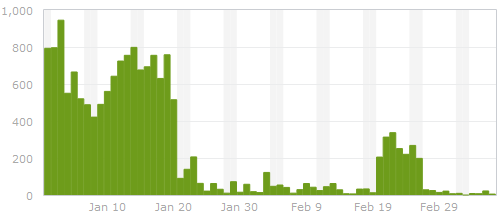
One advantage to this method over the old PHP-only method is that even if the core file is replaced and the server-side validation is lost, the client-side validation continues to work, providing some measure of protection. The screen-shot at the beginning of the post shows the number of spam comments submitted to ardamis.com and detected by Akismet each day from the end of January, 2012, to the beginning of March, 2012. The dramatic drop-off around Jan 20 was when I implemented the method described in this post. The flare-up around Feb 20 was when I updated WordPress and forgot to replace the modified core file for about a week.

Now, for a little extra protection, you can rename the wp-comments-post.php file and change the path in the comment form’s action attribute. I’ve posted logs showing that some bots just try to post spam directly to the wp-comments-post.php file, so renaming that file is an easy way to cut down on spam. Just remember to come back and delete the wp-comments-post.php file each time you update WordPress.

While making changes to my WordPress theme, I noticed that the error_log file in my theme folder contained dozens of PHP Fatal error lines:

...
[01-Jun-2011 14:25:15] PHP Fatal error:  Call to undefined function  get_header() in /home/accountname/public_html/ardamis.com/wp-content/themes/ars/index.php on line 7
[01-Jun-2011 20:58:23] PHP Fatal error:  Call to undefined function  get_header() in /home/accountname/public_html/ardamis.com/wp-content/themes/ars/index.php on line 7
...

The first seven lines of my theme’s index.php file:

<?php ini_set('display_errors', 0); ?>
<?php
/**
 * @package WordPress
 * @subpackage Ars_Theme
*/
get_header(); ?>

I realized that the error was being generated each time that my theme’s index.php file was called directly, and that the error was caused by the theme’s inability to locate the WordPress get_header function (which is completely normal). Thankfully, the descriptive error wasn’t being output to the browser, but was only being logged to the error_log file, due to the inclusion of the ini_set(‘display_errors’, 0); line. I had learned this the hard way a few months ago when I found that calling the theme’s index.php file directly would generate an error message, output to the browser, that would reveal my hosting account username as part of the absolute path to the file throwing the error.

I decided the best way to handle this would be to check to see if the file could find the get_header function, and if it could not, simply redirect the visitor to the site’s home page. The code I used to do this:

<?php ini_set('display_errors', 0); ?>
<?php
/**
* @package WordPress
* @subpackage Ars_Theme
*/
if (function_exists('get_header')) {
	get_header();
}else{
    /* Redirect browser */
    header("Location: http://" . $_SERVER['HTTP_HOST'] . "");
    /* Make sure that code below does not get executed when we redirect. */
    exit;
}; ?>

So there you have it. No more fatal errors due to get_header when loading the WordPress theme’s index.php file directly. And if something else in the file should throw an error, ini_set(‘display_errors’, 0); means it still won’t be sent to the browser.

Just a few notes to myself about monitoring web sites for infections/malware and potential vulnerabilities.

Tools for detecting infections on web sites

Google Webmaster Tools

Your first stop should be here, as I’ve personally witnessed alerts show up in Webmaster Tools, even when all the following tools gave the site a passing grade. If your site is registered here, and Google finds weird pages on your site, an alert will appear. You can also have the messages forwarded to your email account on file, by choosing the Forward option under the All Messages area of the Home page.

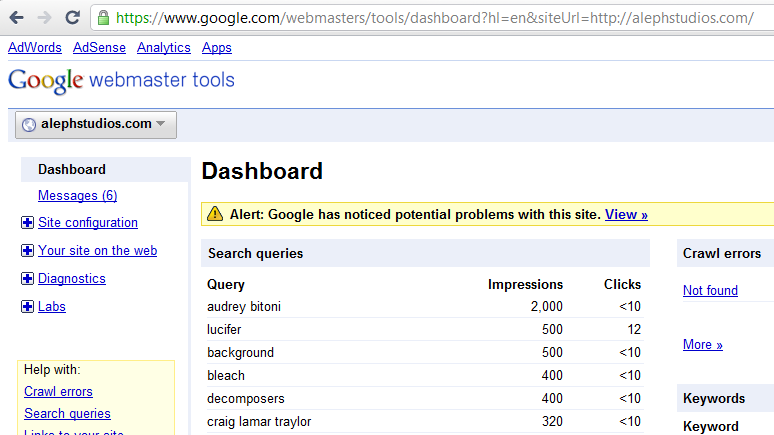
Google Webmaster Tools Hack Alert

Google Safe Browsing

The Google Safe Browsing report for ardamis.com: http://safebrowsing.clients.google.com/safebrowsing/diagnostic?site=ardamis.com

Norton Safe Web

https://safeweb.norton.com/

The Norton Safe Web report for ardamis.com: https://safeweb.norton.com/report/show?url=ardamis.com

Tools for analyzing a site for vulnerabilities

Sucuri Site Check

http://sitecheck.sucuri.net/scanner/

The Sucuri report for ardamis.com: http://sitecheck.sucuri.net/scanner/?scan=www.ardamis.com.

I’ve written a few tutorials lately on how to reduce page load times. While I use Google’s Page Speed Firefox/Firebug plugin for evaluating pages for load times, there are times when I want a second opinion, or want to point a client to a tool. This post is a collection of links to online tools for testing web page performance.

Page Speed Online

http://pagespeed.googlelabs.com/

Google’s wonderful Page Speed tool, once only available as a Firefox browser Add-on, finally arrives as an online tool. Achieving a high score (ardamis.com is a 96/100) should be on every web developer’s list of things to do before the culmination of a project.

Enter a URL and Page Speed Online will run performance tests based on a set of best practices known to reduce page load times.

Optimizing caching – keeping your application’s data and logic off the network altogether
Minimizing round-trip times – reducing the number of serial request-response cycles
Minimizing request overhead – reducing upload size
Minimizing payload size – reducing the size of responses, downloads, and cached pages
Optimizing browser rendering – improving the browser’s layout of a page

WebPagetest

http://www.webpagetest.org/

WebPagetest is an excellent application for users who want the same sort of detailed reporting that one gets with Page Speed.

Load time speed test on first view (cold cache) and repeat view (hot cache), first byte and start render
Optimization checklist
Enable keep-alive, HTML compression, image compression, cache static content, combine JavaScript and CSS, and use of CDN
Waterfall
Response headers for each request

Load Impact

http://loadimpact.com/pageanalyzer.php

Load Impact is an online load testing service that lets you load- and stress test your website over the Internet. The page analyzer analyzes your web page performance by emulating how a web browser would load your page and all resources referenced in it. The page and its referenced resources are loaded and important performance metrics are measured and displayed in a load-bar diagram along with other per-resource attributes such as URL, size, compression ratio and HTTP status code.

ByteCheck

http://www.bytecheck.com/

ByteCheck is a super minimal site that return your page’s all-important time to first byte (TTFB). Time to first byte is the time it takes for a browser to start receiving information after it has started to make the request to the server, and is responsible for a visitor’s first impression that a page is fast- or slow-loading.

Web Page Analyzer

http://websiteoptimization.com/services/analyze/

My opinion is that the Web Page Analyzer report is good for beginners without much technical knowledge of things like gzip compression and Expires headers. It’s a bit dated, and is primarily concerned with basics like how many images a page contains. It tells you how fast you can expect your page to load for dial-up visitors, which strikes me as quaint and not particularly useful.

Total HTTP requests
Total size
Total size per object type (CSS, JavaScript, images, etc.)
Analysis of number of files and file size as compared to recommended limits.

The Performance Grader

http://www.joomlaperformance.com/component/option,com_performance/Itemid,52/

This is another simplistic analysis of a site, like Web Page Analyzer, that returns its analysis in the form of pass/fail grades on about 14 different tests. I expect that it would be useful for developers who want to show a client a third-party’s analysis of their work, if the third-party is not terribly technically savvy.

One unique thing about this tool, though, is that it totals up the size of all images referenced in CSS files (even those that the current page isn’t using).

HTML Size
Total Size
Total Requests
Generation Time
Number of Hosts
Number of Images
Size of Images
Number of CSS Files
Size of CSS Files
Number of Script Files
Size of Script Files
HTML Encoding
Valid HTML
Frames

As of April, 2011, the home page of ardamis.com has over two million inbound links, with over 2,800,000 total inbound links to all pages on the site.

This is an increase of 1,200,000 inbound links to the home page alone since July, 2010. I calculate that the home page is gained an average of 150,000 inbound links a month during the last eight months. That’s pretty amazing.

April 2011 Inbound Links

But I continue to be disappointed in the Site Performance area of Webmaster Tools. Try as I might, Google still thinks my site is crushingly slow, with average load times of 2.9 seconds, even though my independent tests suggest that the site consistently returns pages in less than two seconds.

April 2011 Site Performance

I’ll keep at it.